
Bottom Line: DeepL Translate isn't just a utility; it’s a sophisticated linguistic engine that prioritizes context over raw volume, making Google Translate feel like a blunt instrument by comparison.
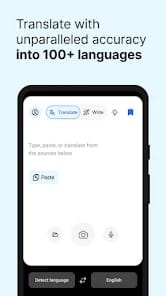
The brilliance of DeepL lies in its refusal to be a generalist. When you open the app, you aren't greeted by a cluttered mess of social features or unnecessary bloat; you are greeted by a high-performance workspace. The user experience flow is built around speed and friction reduction. You type, you paste, or you speak, and the result appears with a level of syntactic grace that is genuinely startling the first time you witness it.
The Nuance Engine
Most translators fail because they treat language like a math problem—variable X always equals variable Y. DeepL understands that language is fluid. In my testing, when translating technical documentation from German to English, DeepL consistently chose the industry-standard term over the literal dictionary definition. It recognizes the difference between a "bolt" in a hardware context and a "bolt" of lightning. This contextual awareness reduces the need for back-translation or manual editing, which is the ultimate metric for a utility of this class.
Beyond Simple Substitution: DeepL Write
The inclusion of DeepL Write transforms the app from a translator into a communication suite. It addresses the "I know what I want to say, but I don't know how to say it well" problem. By suggesting synonyms and restructuring clunky sentences, it bridges the gap between basic literacy and professional fluency. It’s the difference between being understood and being respected. This feature alone justifies the app's footprint on a professional’s device, acting as a final polish on correspondence that needs to land perfectly.
The Professional Workflow
The document translation feature is perhaps the most underrated aspect of the platform. For anyone who has ever tried to copy-paste a 20-page PDF into a browser window, DeepL’s ability to ingest a file and spit out a formatted replica in another language is a massive productivity win. There is no latency in the processing of complex layouts, and while the Pro version is required for the heaviest lifting, even the free tier's capabilities feel like a gift to efficiency.
Interface & Friction
The interface is a masterclass in functional minimalism. It avoids the trap of skeuomorphism or over-designed menus. Instead, it leans into a clean, typography-first aesthetic that puts the focus exactly where it needs to be: the text. Onboarding friction is non-existent. You don't need a tutorial to understand the value proposition; you see it in the first sentence it corrects for you. However, the reliance on a cloud-based engine means your experience is tethered to your data connection—a minor point in 2026, but one that matters for the rural traveler.