



Bottom Line: SketchAR presents an intriguing, technology-forward approach to artistic development through augmented reality. While its innovative tracing capabilities and vast lesson library offer genuine potential, the app's finicky AR tracking and sometimes aggressive monetization strategies can disrupt the creative process.
SketchAR's fundamental promise—to make drawing accessible and less intimidating through augmented reality—is both its greatest strength and its most notable vulnerability. The core AR tracing mechanic, when it functions as intended, feels genuinely revelatory. The act of seeing a virtual sketch overlaid onto a physical piece of paper, guiding the hand, transforms a daunting task into an achievable one. This technological intervention effectively lowers the barrier to entry for aspiring artists, allowing them to focus on motor skills and spatial relationships rather than the initial, often frustrating, act of proportioning and perspective. For experienced artists, it serves as a powerful utility for scaling, transferring complex designs, or experimenting with layouts before committing to a final medium. The capacity to upload one's own images and convert them into traceable outlines is a particularly astute inclusion, moving beyond rote instruction to personal creative application.
However, the precision required for AR tracing means the user experience is frequently held hostage by the stability of the device and its environment. The internal research and common user feedback underscore a critical issue: AR tracking sensitivity. Any minor device movement, obstruction of the camera's view, or loss of tracking markers can cause the projected lines to "jump," rendering the guiding image useless and forcing a recalibration. This isn't merely an inconvenience; it fundamentally breaks the flow of artistic concentration. A tool meant to alleviate complexity instead introduces its own form of technical friction, often necessitating a stable setup—a tripod or dedicated holder—which not every casual user will possess or wish to employ. The ideal of an effortlessly projected guide often collides with the reality of maintaining a perfectly static camera.
Beyond the AR mechanics, SketchAR's educational component is robust. A library of over 750 lessons is no small feat, offering structured pathways through various drawing styles. This content breadth, coupled with AI-driven personalized growth plans, suggests a genuine commitment to artistic development. The community challenges further enhance this, injecting a social, motivational layer into what can often be a solitary pursuit. Yet, the business model introduces another layer of scrutiny. The "limited free content" and "frequent prompts for in-app purchases or subscriptions" are a recurring critique. While robust development and content creation demand revenue, an aggressive gating of features or an incessant push for upgrades can detract significantly from the initial user experience, transforming an inviting learning environment into a transactional one. Occasional intrusive advertisements exacerbate this, pulling users out of their creative headspace.
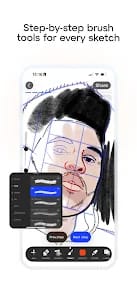
The digital canvas, while versatile with its brush and layer options, largely serves as a complementary feature to the AR tracing. It's competent, but it doesn't necessarily redefine digital art creation in the way the AR component attempts to redefine physical drawing. Its inclusion rounds out the toolkit, providing a space for digital refinement or experimentation, but it's not the primary draw. The promise of VR headset integration and future Apple Vision Pro support hints at a truly immersive artistic future, yet these are currently aspirational rather than fully realized features for the broader user base. For now, the core utility remains tethered to the mobile AR experience, with all its inherent strengths and frustrating weaknesses. The interface itself is generally user-friendly, navigating the vast library and tools without excessive cognitive load, a crucial aspect given the technical nature of AR. But its effectiveness is consistently undercut by the very technology it champions when tracking falters.