

Bottom Line: Instapaper remains the definitive sanctuary for long-form devotees, trading the chaotic "attention economy" for a focused, typographically superior reading experience.
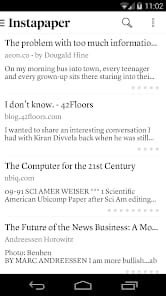
The core utility of Instapaper isn't just about saving a link; it’s about decoupling consumption from discovery. On the modern web, the friction of reading an article is often so high that we bounce before the second paragraph. Instapaper eliminates this friction by moving the content to a controlled environment. The interface is a masterclass in restraint. There are no "trending" sidebars, no social metrics, and no "you might also like" distractions.
The Reading Experience
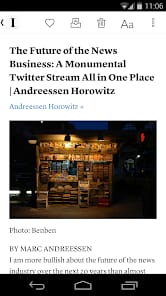
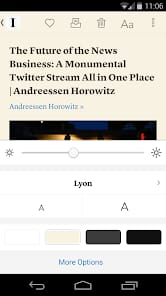
The typographical fidelity here is what sets it apart from browser-native "Reader Modes." Instapaper offers a curated selection of fonts that are actually designed for long-form reading—not just UI icons. When you switch to Sepia or Dark Mode, the transitions are smooth, and the text scaling is handled without the layout breaking. It feels like reading a well-designed book rather than a webpage.
However, the "strip-everything" approach isn't without its casualties. Complex articles with interactive charts or non-standard embeds often suffer during the conversion process. While the parser is generally excellent, it can occasionally miss the mark on multi-part stories or sites with aggressive paywalls. There is a specific type of onboarding friction for new users who expect a visual bookmarking tool like Pinterest; Instapaper is for the text-first user, and if an article is mostly images, its value proposition begins to thin.
Knowledge Management
The evolution from a simple list to a research powerhouse is where Instapaper justifies its existence in the current professional's toolkit. The highlighting system is intuitive: a long-press and drag allows you to "clip" insights that are then synced across all devices. For those in academia or journalism, this turns a reading list into a searchable database of quotes and sources.
The integration with Kindle remains the service’s enduring trump card. It’s the one feature that feels truly transformative. Sending a week’s worth of long-form journalism to an e-ink screen for a Sunday morning read is a luxury that Pocket hasn't quite replicated with the same elegance. It effectively turns a $100 e-reader into a custom-printed magazine.
The Development Velocity
Being managed by a small, independent team is a double-edged sword. On one hand, you don’t have to worry about the product being "disrupted" by a corporate parent looking to monetize your data. On the other hand, sync bugs and slow support responsiveness can be an occasional reality. During my testing, there were moments where an article saved on the desktop didn't immediately appear on the mobile client without a manual pull-to-refresh—a minor latency that feels slightly dated in 2026.