



Bottom Line: Loom maintains its dominant position as the premier tool for asynchronous video communication, offering an intuitive, robust platform that streamlines workflows, though its mobile execution occasionally betrays its desktop-centric origins.
Loom didn't just introduce a product; it evangelized a paradigm shift: the asynchronous imperative. Its genius lies not merely in its recording capabilities, but in how it stitches together creation, distribution, and collaboration into a fluid, almost thoughtless, experience. The fundamental premise—record once, share infinitely, consume on demand—is a potent antidote to the chronic meeting fatigue plaguing knowledge workers.
The user experience flow, particularly for recording, is what truly sets Loom apart. From the moment you initiate a capture, the interface melts away, leaving a clean, unobtrusive overlay that guides you through the process. Whether you’re demonstrating a complex bug or explaining a new feature, the act of recording feels effortless, devoid of the technical overhead that often plagues lesser screen capture tools. This ease of use is not an accident; it's the product of deliberate design choices focused on reducing friction at every touchpoint.
The true power emerges, however, with the instantaneous link generation. In an age where digital content often gets bottlenecked by uploads, conversions, and attachments, Loom's near-instantaneous cloud hosting and sharable URL capability feels almost magical. This feature democratizes video communication, making it as simple to send a detailed visual explanation as it is to type a quick message. The tight integrations with popular communication platforms mean these video messages aren't just hosted; they're woven directly into the fabric of daily collaboration, appearing rich and interactive within Slack or email threads.
Furthermore, Loom understands that communication is a two-way street. Its collaborative features, particularly time-stamped comments, elevate it beyond a simple broadcasting tool. The ability to pinpoint specific moments in a video for feedback transforms a passive viewing experience into an active dialogue. This precision is invaluable for design critiques, code reviews, or educational contexts where granular feedback is crucial. Emoji reactions, while seemingly trivial, offer a quick, emotional pulse check, allowing viewers to signal understanding or acknowledgment without interrupting flow. These features collectively foster a more engaged and efficient feedback loop, cutting down on back-and-forth email chains or follow-up meetings.
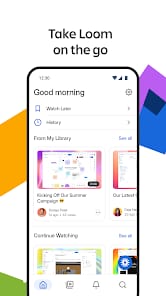
However, a critical eye reveals a slight dichotomy between the desktop and mobile experiences. While the mobile applications provide robust tools for recording, viewing, and basic management, the more advanced editing features remain primarily tethered to the Loom web application. This isn't necessarily a flaw, but a design decision that positions the mobile app as a content capture and consumption device, while reserving heavy-duty post-production for more capable environments. For the busy professional on the go, this distinction is generally acceptable, as the primary use case for mobile Loom is often quick captures and immediate sharing rather than intricate video production. Yet, it highlights a subtle tension: the mobile app is exceptionally good at what it does, but it’s not the complete Loom experience, nudging users back to a desktop for full functionality.