
Bottom Line: LumaFusion is the definitive proof that mobile devices are no longer just for content consumption; it is a surgical, professional-grade video editor that makes no apologies for its touch-first architecture.
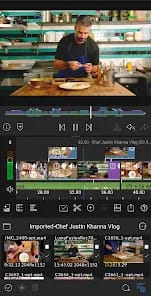
The brilliance of LumaFusion isn't found in a checklist of features, but in its Interface Logic. Editing video on a touch screen is traditionally a recipe for frustration—fat-fingering a cut or struggling with precise clip placement is usually the norm. LumaTouch solved this by leaning into the iPad’s strengths rather than fighting them. The UI is dense, yes, but it’s logical. The workspace is modular, allowing you to prioritize the preview window or the timeline depending on your current task.
The Magnetic Workflow
The core experience revolves around a Magnetic Timeline that feels responsive and predictable. When you drop a 4K 60fps ProRes clip into the mix, there is no stutter, no hesitation. This is where the marriage of software and silicon becomes apparent. On modern M-series iPads, LumaFusion handles 10-bit HDR footage with a fluidity that puts many mid-range laptops to shame. The "Search and Replace" functionality for missing media and the ability to edit directly from external SSDs via USB-C removes the storage bottleneck that previously crippled mobile workflows.
Precision Control vs. Onboarding Friction
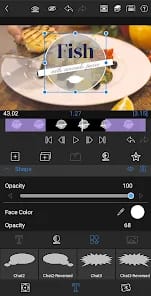
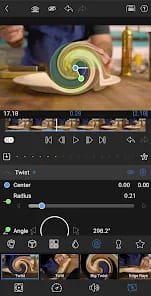
Where LumaFusion truly separates itself from "toy" apps is in its Keyframing and Audio Ducking. Most mobile editors automate these processes to the point of uselessness. LumaFusion gives you the graph. You can manually adjust the velocity of a zoom or the precise curve of a volume fade. However, this power comes with significant onboarding friction. If you have never used a professional NLE, the sheer density of the icons and the nesting of menus will feel like staring into a cockpit. It demands a level of commitment that casual users might find off-putting, but for the professional, this complexity is the price of freedom.
The Color and Export Pipeline
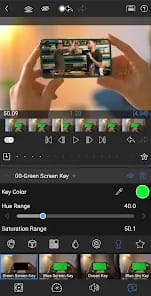
The inclusion of LUT support is more than a gimmick; it’s a necessity for anyone shooting on a Sony A7SIII or a Blackmagic Cinema Camera. Being able to drop a S-Log3 to Rec.709 conversion directly on the timeline transforms the iPad from a "preview device" into a legitimate production hub. The export options are equally granular. You aren’t stuck with a "High/Medium/Low" toggle. You can define bitrates, frame rates, and codecs (including H.265 and ProRes), ensuring the final file meets the delivery requirements of a broadcast network or a high-end social campaign.