



Bottom Line: Paprika 3 is a masterclass in utilitarian software design, trading flashy social gimmicks for a brutal, reliable efficiency that turns the chaotic modern web into a structured culinary database.
To understand why Paprika dominates its category, one must look at the Web Importing tool. This isn’t just a bookmarking feature; it’s a surgical extraction. While competing apps often struggle with non-standard formatting, Paprika’s parser is remarkably robust. It identifies the "signal" (the ingredients and instructions) and discards the "noise" (the ads and SEO-driven narratives). This functionality transforms the chaotic, ad-choked web into a uniform, private library. It solves the "onboarding friction" of digital recipe management by making the act of adding a new dish take seconds rather than minutes of manual data entry.
The Logic of the Workflow
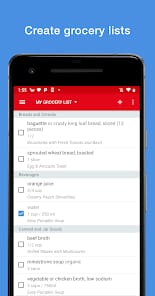
The brilliance of Paprika lies in how it handles the data loop between planning and execution. Most recipe apps stop at storage. Paprika follows you into the grocery store. When you add a recipe to your meal planner, the app doesn't just dump a list of ingredients into a text file. It parses them. It recognizes that "2 eggs" in one recipe and "4 eggs" in another should be combined into a single line item for "6 eggs." It then sorts these items by store aisle. This isn't just a convenience; it’s a structural optimization of the user’s time.
The Pantry Management system adds another layer of sophistication. By tracking what you already have in stock, the app prevents redundant purchases. This level of integration—connecting the recipe database to the meal plan, the meal plan to the grocery list, and the grocery list to the pantry—creates a closed-loop system that reduces cognitive load. You stop wondering what’s for dinner and start executing a pre-calculated plan.
The Cooking Experience
Once you are actually in the kitchen, Paprika shifts from a database manager to a functional assistant. The Smart Recipe View is designed for the high-friction environment of active cooking. Ingredients can be crossed off as they are used, preventing the "did I already add the salt?" moment of panic. Directions can be highlighted to track progress. The inclusion of automatic timers that detect duration text in the instructions is a subtle but vital touch.
However, the app is not without its legacy debt. In an era where OCR (Optical Character Recognition) is standard in most productivity suites, Paprika’s lack of a camera-based scanning tool for physical cookbooks is a glaring omission. Users with stacks of heirloom recipe cards are still forced into the manual labor of typing, a hurdle that feels increasingly archaic.
The Politics of the One-Time Fee
We have reached a point of subscription fatigue where every utility wants $4.99 a month for the privilege of existence. Paprika’s decision to stick with a one-time fee per platform is a major draw for the power user. While critics point out that buying the app separately for iOS, Android, macOS, and Windows can feel like "double-dipping," the lack of a recurring tax on your data is a fair trade. You own your database. With Paprika’s own cloud sync service, the transition between mobile and desktop is fluid, maintaining a single source of truth for your culinary life without the threat of a service tier expiration.