

Bottom Line: Morgen is a high-precision instrument for the chronically over-scheduled, successfully consolidating the fragmented chaos of modern work into a single, cohesive timeline—provided you can stomach the premium price of admission.
The fundamental problem with most productivity suites is the "context-switching tax." You see a task in your manager, check your availability in your calendar, and then try to mental-math the two together. Morgen’s Analysis of the workflow suggests that the calendar, not the list, should be the source of truth.
The Workflow Loop
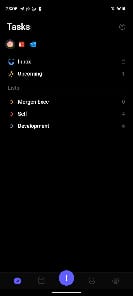
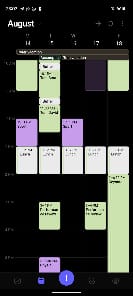
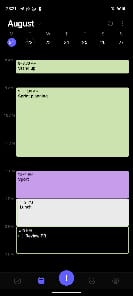
In practice, using Morgen feels less like "checking an app" and more like "operating a cockpit." The interface is remarkably sparse, yet every pixel serves a purpose. When you connect a service like Linear or ClickUp, your tasks appear in a side panel. The magic happens in the drag-and-drop. By moving a "Critical Bug Fix" onto a Tuesday afternoon slot, Morgen creates a visual representation of your capacity. This isn't just organization; it’s psychological enforcement. It forces you to see that your "to-do" list is often a fantasy that doesn't fit into a 24-hour day.
The Meeting Scheduler integration is particularly slick. Most tools treat scheduling as a separate chore. In Morgen, you simply highlight a few slots on your calendar and convert them into a booking link. Because it’s checking against all your synced accounts (iCloud, Outlook, Google), the risk of a "double-book" is virtually eliminated. It’s a level of coordination that feels professional and, more importantly, effortless.
The AI Factor
We have to talk about the "AI-powered planner." In an industry currently obsessed with slapping "AI" on everything, Morgen’s implementation is surprisingly grounded. It doesn't try to write your emails; it tries to solve a bin-packing problem. It looks at your "Smart Frames"—pre-defined blocks for specific types of work—and suggests where your tasks should live. It’s a tool for optimization, not a replacement for human judgment. However, the efficacy of this feature relies heavily on the quality of your inputs. If you don't rigorously categorize your tasks, the AI feels like a glorified "sort" button.
Friction Points
The experience isn't entirely without friction. While the desktop client is a masterclass in utility, the pricing model is a significant hurdle. At $15 to $30 per month, Morgen is asking for a "Pro" commitment. For a solo freelancer, that’s a steep ask when free alternatives exist. Furthermore, while the integrations with Notion and Todoist are robust, they aren't "two-way mirrors" in every sense. Sometimes, metadata from the original task manager gets lost in translation, leaving you with a simplified version of a complex task on your calendar.