

Bottom Line: Stremio promises a unified media experience, and while its innovative add-on architecture centralizes content effectively, persistent performance glitches on Android frequently disrupt what should be a seamless stream.
Stremio's vision of a centralized media hub is, on paper, precisely what the modern consumer demands. The proliferation of streaming services has turned what was once a simple leisure activity into an exercise in app-hopping and subscription management. Stremio attempts to resolve this by acting as a digital concierge, intelligently collating content and presenting it through a single pane of glass. This aggregation extends beyond mere listings; it endeavors to provide direct access, abstracting away the underlying source once content is selected.
The lynchpin of Stremio's architecture, and arguably its most compelling feature, is its add-on system. Unlike traditional media centers that rely on direct integration with services, Stremio's reliance on third-party add-ons fosters an ecosystem that is both flexible and expansive. The claim that these add-ons run remotely to enhance security and privacy is a significant one, suggesting a layer of isolation between the application core and the often-unpredictable world of third-party content sources. This design choice effectively delegates the heavy lifting of content acquisition to a distributed network, allowing Stremio itself to remain a lightweight, metadata-focused client. The practical implication is a dramatically expanded content library, far surpassing what any single proprietary streaming service could offer. However, this extensibility also introduces a variable quality experience, as the reliability and performance become contingent on the stability of individual add-ons.
The user experience flow is largely commendabled. Stremio's interface aims for a clean, intuitive aesthetic, prioritizing content discovery and organization. The ability to track new episode releases, coupled with cross-device synchronization of watch history, speaks to a thoughtful approach to user convenience. For those managing multiple devices, the seamless pick-up-where-you-left-off functionality is a tangible benefit, eliminating the friction of manual progress tracking. The integrated video player is capable, supporting contemporary formats like 4K HDR and offering essential features like subtitle support and offline downloads, positioning it as a comprehensive solution for media consumption.
Yet, beneath this polished veneer lies a frustrating inconsistency. User feedback consistently points to significant performance issues that undermine Stremio's core promise of a "seamless entertainment experience." Frequent application crashes are not merely an annoyance; they are a fundamental breakdown in utility. Furthermore, audio-video synchronization problems, where sound outpaces video, can render certain content almost unwatchable. The reported unreliability and slow streaming from torrents, a common source for many add-ons, highlight a critical vulnerability in its dependency on external providers. While the add-on system is Stremio's strength, it also becomes its Achilles' heel when the quality of these external components falters. The user's experience is not just about the application's interface, but the integrity of the stream itself. Automatically appearing language subtitles and visible hidden items on screen, introduced in newer versions, further disrupt immersion and suggest a lack of rigorous quality assurance. These aren't minor bugs; they are fundamental flaws that impede the consumption of media, which is the singular purpose of the application. The convenience of aggregation is quickly eroded when the playback experience is compromised.
Interface
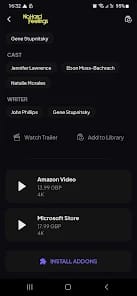
Stremio’s interface generally adheres to modern design principles: minimalist, content-focused, and ostensibly easy to navigate. It prioritizes visuals, allowing cover art and promotional images to dominate, which is effective for discovery. However, the reported issues with "visible hidden items on screen" imply a lack of pixel-perfect execution, suggesting UI elements are bleeding through or rendering incorrectly, which degrades the perceived professionalism and user trust. An intuitive design is only truly effective when it's flawlessly rendered.