


Bottom Line: Vivaldi isn’t just a browser; it’s a high-performance productivity suite that treats the mobile web with the respect it deserves, making mainstream competitors look like skeletal toys.
Vivaldi’s core philosophy centers on the rejection of the "lowest common denominator" design. Most mobile browsers assume the user is a passive consumer; Vivaldi assumes you are an active producer. This is most evident in its approach to the browser's most fundamental element: the tab.
The Tab Management Hegemony
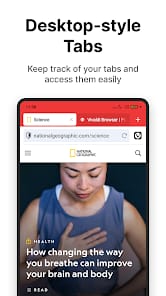
The "Tab Stack" system is Vivaldi’s masterstroke. On a standard mobile browser, managing twenty tabs is a nightmare of scrolling through a vertical list of cards. Vivaldi introduces a dual-row tab bar. It sounds like it would be a claustrophobic disaster on a six-inch screen, but in practice, it’s an ergonomic revelation. By allowing users to stack related tabs together—say, five tabs for travel research and three for work—the browser mirrors the way our brains actually categorize information. The ability to see your active group and the tabs within it simultaneously reduces the cognitive load of "tab switching" from a chore to a flick.
Customization as a Workflow Utility
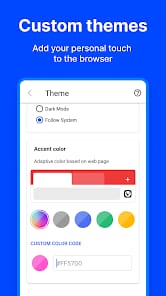
Customization here isn't just about changing the color of the toolbar; it’s about interface ergonomics. Vivaldi allows you to move the address bar to the bottom of the screen—a necessity in the era of gargantuan smartphones where the top of the screen is a "dead zone" for one-handed use. You can toggle the status bar, show or hide the tab bar, and even force websites to show their desktop versions by default. This isn't just "flavoring"; it's the ability to build a tool that fits the geometry of your hands and the specifics of your workflow.
The All-in-One Toolbox
The integration of a note-taker and a reading list directly into the browser's side panel (or bottom menu on mobile) addresses a chronic pain point in mobile productivity: context switching. In a typical workflow, finding a piece of information requires copying text, switching apps, and pasting it into a notes app. Vivaldi keeps you within the "loop." You can highlight text and "Copy to Note" without ever leaving the page. It’s a tightly coupled system that acknowledges that browsing is rarely an end in itself; it’s usually the first step in a larger task.
Privacy Without Friction
The built-in Ad and Tracker Blocker is more than a convenience; it’s a performance booster. By blocking scripts at the engine level before they even begin to download, Vivaldi bypasses the render-blocking issues that plague many "lite" browsers. Pages load faster because they are physically smaller. More importantly, Vivaldi’s "no tracking" policy is a refreshing stance in a Chromium-dominated world. While Google struggles to balance its role as a browser maker with its identity as an advertising giant, Vivaldi has no such conflict of interest. Your history remains yours.